Ad Budget Allocation: The Complete Guide for 2026
Where you put the money matters as much as how much you spend. We have seen the same budget produce a loss in one split and a healthy profit in another. This guide explains how we decide the split for new clients, and how we move it once the data comes in.
Key takeaways
- Set the total budget from the business goal and your affordable cost per customer, then split it. Never split an arbitrary number.
- Fund the channels closest to the sale first, then add channels that create demand, then ring-fence a test budget.
- Move money based on marginal returns, meaning the result of the next unit of spend, not the average return of the channel.
- Give each channel enough budget to learn. A small budget spread across many platforms usually underperforms a focused one.
- Review the split monthly and rewrite it quarterly. Daily reallocations mostly react to noise.
01Why budget allocation decides results
Two brands with identical budgets, products and creative can end up with very different results because of how they split their spend. One puts most of the money into retargeting and branded search, sees brilliant ROAS in every dashboard, and slowly runs out of new customers. The other spreads thinly across seven platforms, none of which gets enough data to work. A third finds a balance and grows.
Ad budget allocation is the decision about how much of your paid media budget goes to each channel, campaign type and funnel stage. It sits inside the wider media plan. If you have not read it yet, our media planning guide covers goals, channel jobs and review rhythm. This post goes deeper into the money itself.
There is no perfect split that works for every business. What there is, and what we use with every client, is a method: set the total from the goal, allocate by the job each channel does, reserve money to learn, and move budget on evidence.
02Step one: set the total budget from the goal
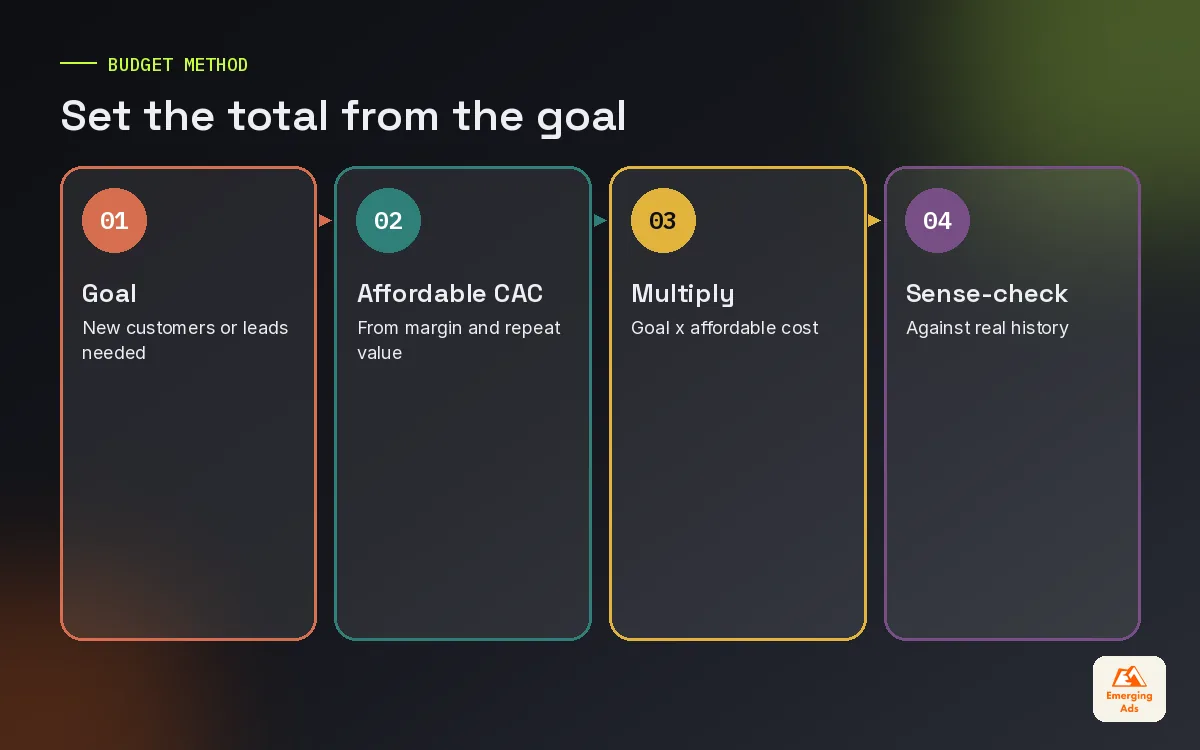
Most businesses start with a number that feels comfortable, then ask how to split it. We work the other way round. The total should come from what you need to achieve and what you can afford to pay for each customer.
- Define the goal: for example, 400 new customers a month.
- Work out the affordable cost per customer: based on first-order margin and, where you have the data, repeat purchase value. Our ad spend ROI guide walks through the maths.
- Multiply: 400 customers at an affordable 45 each suggests roughly 18,000 a month.
- Sense-check against history: if you have never acquired customers below 70, the plan needs either more budget, a better offer or a lower goal.
03Step two: allocate by channel job
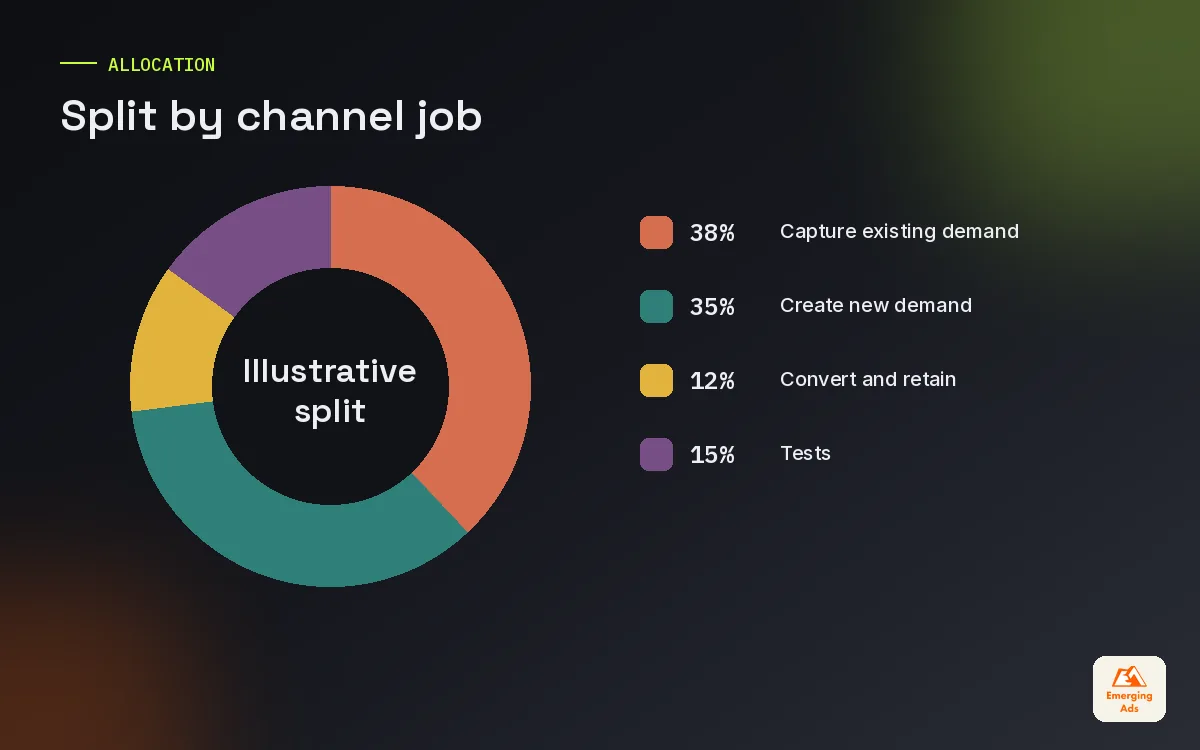
Once the total is set, give each channel a job and a share. We think in three layers.
| Layer | Typical channels | Illustrative share |
|---|---|---|
| Capture existing demand | Google Search, Shopping, Amazon Sponsored Products | 35 to 50 percent |
| Create new demand | Meta prospecting, TikTok, YouTube Demand Gen, Snapchat | 30 to 45 percent |
| Convert and retain | Retargeting on Meta, Google and YouTube; email and WhatsApp support | 10 to 20 percent |
Then set aside a test budget of 10 to 20 percent of the total, taken proportionally from the layers above. The ranges are starting points, not benchmarks. A new brand nobody searches for yet cannot spend half its budget capturing demand that does not exist, so it leans harder into demand creation. An established brand with strong search volume can lean the other way.
Within capture, Google Search ads and Performance Max usually take the lion’s share, with Amazon advertising added where the marketplace matters. Within creation, Meta advertising is still the core for most brands, with TikTok ads and YouTube ads joining as creative capacity allows.
04Allocation by business type
These patterns reflect what we see across accounts. They are illustrations of how the thinking shifts, not templates.
| Business type | Where budget usually leans | Why |
|---|---|---|
| New DTC brand | Heavier on Meta and TikTok prospecting | Little search demand yet; needs to create it |
| Established e-commerce brand | Balanced between search, shopping and social | Existing demand to capture plus growth to create |
| Amazon-first seller | Heavier on Sponsored Products and Brands | Buyers already shop there; ads feed organic rank |
| Local service business | Heavier on search and local campaigns | High intent, geographic limits |
| B2B with long sales cycle | Search, LinkedIn and retargeting | Specific buyers, long consideration |
| App | App install campaigns across Meta, Google and TikTok | Optimised to in-app events, not installs alone |
For B2B clients, LinkedIn advertising often takes a larger share than its cost per click would suggest, because the targeting by job title and company is hard to match anywhere else.
05Step three: move money on marginal returns
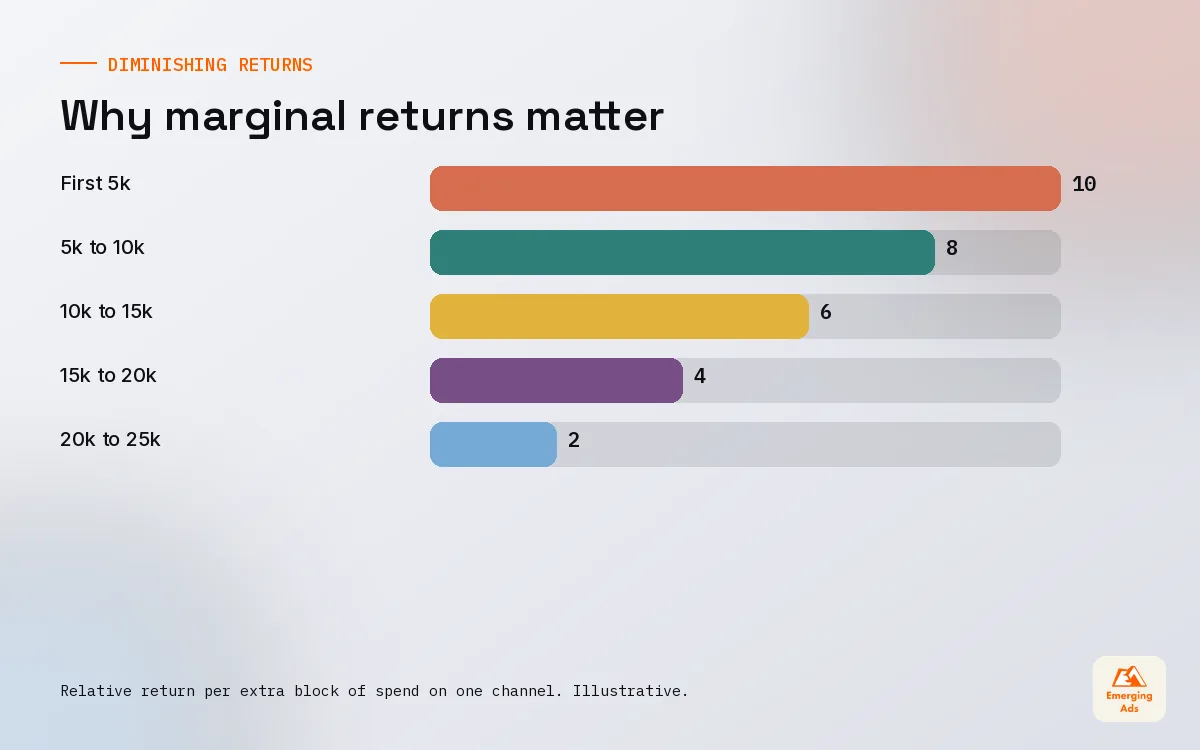
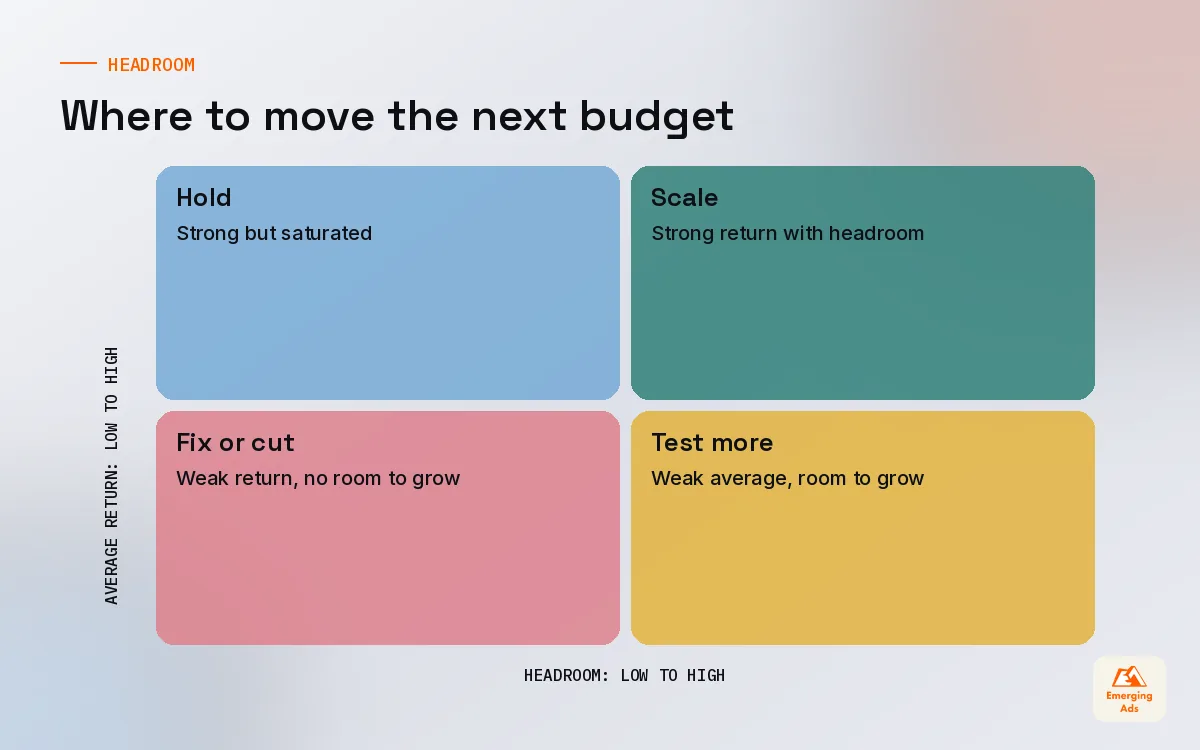
This is the idea that changes how most teams allocate once they understand it. The average return of a channel tells you how it has performed. The marginal return tells you what the next unit of spend will do. Budget decisions should follow marginal returns.
Every channel has diminishing returns. The first few thousand on Google Search buy the most relevant, highest-converting searches. Each extra thousand buys slightly less relevant ones at a higher cost. So a channel with a great average ROAS might already be at the point where extra spend returns very little.
- Signs a channel has headroom: cost per result stays stable as spend rises, impression share is limited by budget, and frequency is low.
- Signs a channel is saturated: cost per result climbs with each budget increase, frequency rises, and search impression share is already high.
Test marginal returns directly by raising a channel’s budget in steps for a couple of weeks and watching what happens to cost per result on the extra spend. The reverse works too: cutting a channel’s budget for a period and watching total sales tells you how much of that channel’s reported results were truly additional. We run these step tests and holdouts on the biggest lines in an account at least once or twice a year. Blended reporting makes this far easier, which is why our ad performance reporting guide puts blended numbers on page one.
06Minimum budgets: give each channel room to learn
Ad platforms learn from conversions. A campaign that gets only two or three conversions a week never collects enough data to optimise properly, so it stays expensive. This is why spreading a small budget across many channels is one of the most common allocation mistakes we fix.
A rough way to check whether a channel has enough budget: estimate the cost per conversion, then multiply by the number of conversions a week the platform needs to optimise reliably. If your budget cannot cover that for a channel, either fund it properly or leave it out for now.
Fewer, better-funded channels almost always beat many underfunded ones. We would rather see a brand master two platforms before adding a third.
07Allocation traps we see in new accounts
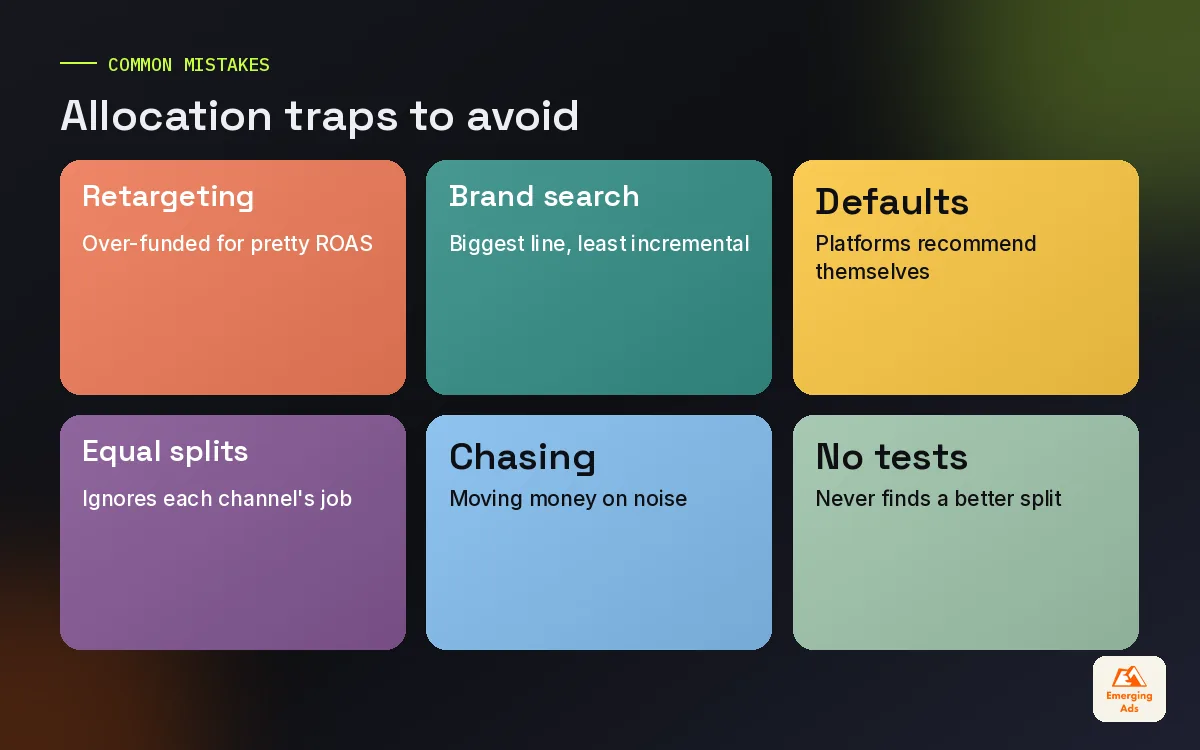
- Over-funding retargeting. It shows great ROAS, but the pool of warm people is limited. Over-spend here just raises frequency and claims credit for sales that would have happened anyway. Well-run Meta retargeting is sized to the audience, not to the ROAS.
- Branded search as the biggest line. Protect your brand name, but test how much of that spend is truly incremental.
- Platform recommendations as strategy. Every platform recommends spending more on itself.
- Equal splits. Giving every channel the same budget ignores what each one is good at.
- Chasing last week’s winner. Moving large amounts of money every few days in response to noise resets learning and makes results worse.
- No test budget. Without it, the allocation can never discover a better split.
08Seasonality, promotions and pacing
Budgets should not be flat across the year. Demand moves with seasons, paydays, holidays and your own promotions, and so do costs. Big retail moments such as Black Friday, Ramadan, Diwali or the end-of-year holidays often bring higher costs per click alongside higher conversion rates.
- Build a monthly budget curve from last year’s sales pattern rather than dividing the annual budget by twelve.
- Warm up before peaks. Increase prospecting a few weeks before a big sale so there is a larger retargeting pool when the offer goes live.
- Pace within the month. Check spend against plan weekly so you do not run out before month end or underspend and lose ground.
Pacing and allocation both live in the dashboard we build for clients. A Looker Studio dashboard that shows spend against the monthly curve by channel makes these calls quick.
09A monthly allocation review
Once a month, we run the same review for every client. It takes about an hour and keeps the allocation honest.
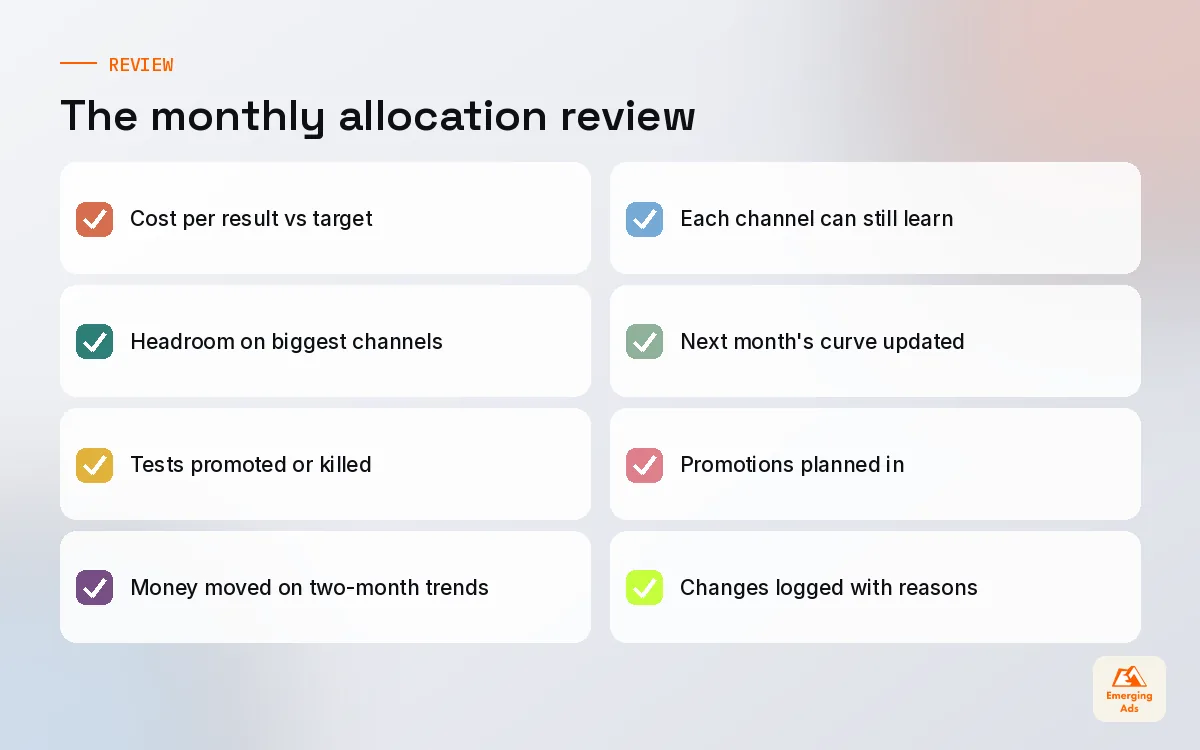
- Compare each channel’s cost per result against its target for the month.
- Check signs of headroom or saturation on the biggest channels.
- Review test results against their pass marks and promote or kill each test.
- Move budget from channels that missed target for a second month to those with proven headroom.
- Check that each channel still has enough budget to learn.
- Update the curve for the next month, including any promotions.
Quarterly, we step back further and ask whether channel jobs have changed, whether a new platform deserves a test, and whether attribution modelling would help settle arguments about channel credit. Our creative testing guide matters here too, because creative supply often limits how much a channel can absorb. For help with any of this, see our full paid media services or the oldemergingads.com homepage.
Frequently asked questions
Straight answers to what clients ask us most about ad budget allocation.
How should I allocate my ad budget?
What percentage of revenue should go to advertising?
How much should I spend on each ad platform?
What is marginal return on ad spend?
How often should I change my ad budget allocation?
Should I spend more on prospecting or retargeting?
How much should I keep for testing?
How do I allocate budget for a new brand?
Is it better to focus on one channel or many?
How do I know when a channel is saturated?
Should my budget change during sales seasons?
Not sure your budget is in the right places?
Share your current spend by channel and results for the last quarter. We will show you where the marginal money is working hardest, and what a better split could look like.
Book your free audit